New to Chillverse? Welcome! Creating your account only takes a few minutes. This guide walks you through every step, whether you prefer signing up with Google or your email address.
Before you begin
Make sure you have:
A valid email address (or a Google account)
A secure password
Your date of birth
An internet connection
---
Step 1: Open the Sign Up page
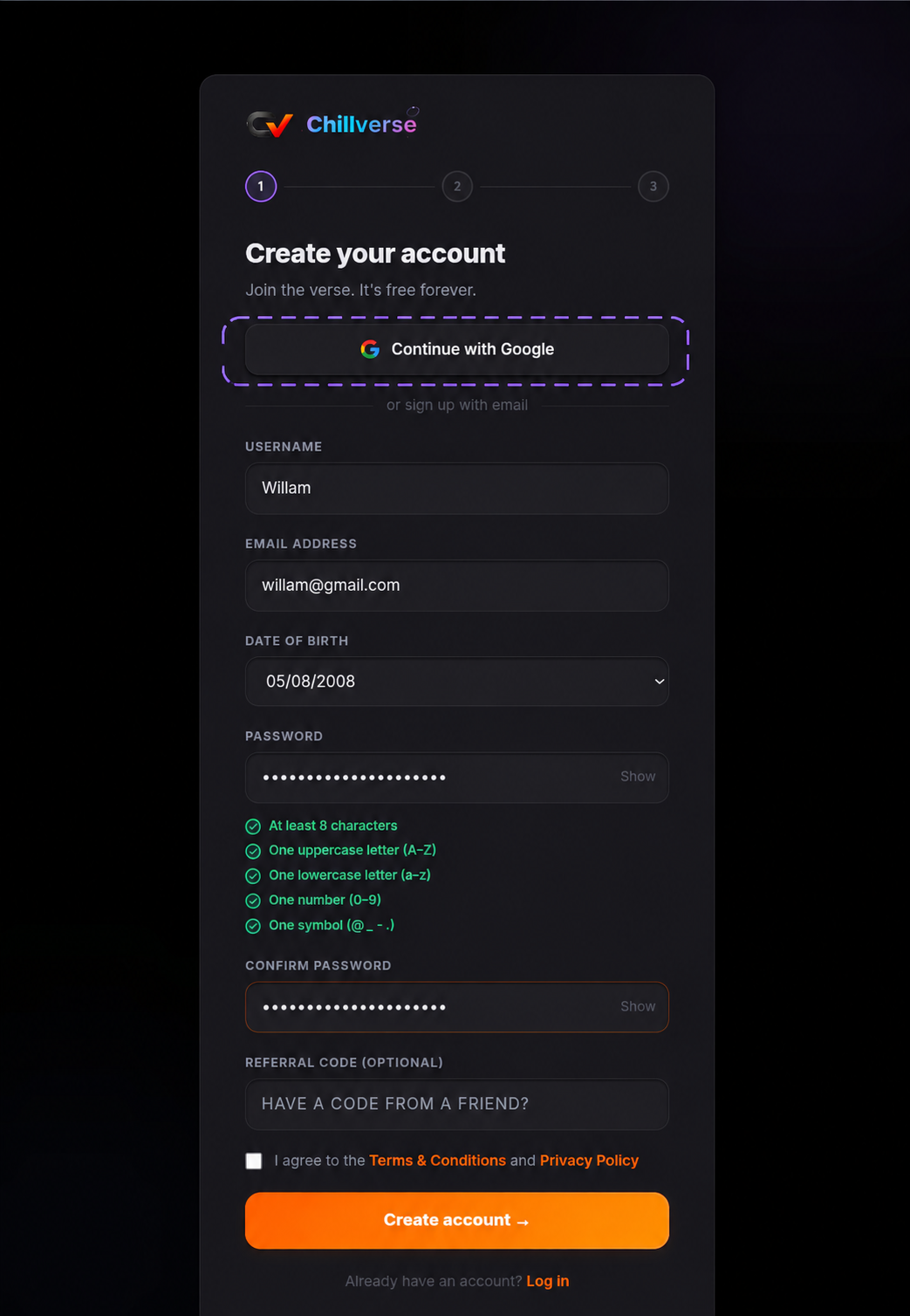
Visit the Chillverse Sign Up page and you'll see a screen similar to the one below.
Tip: The fastest way to get started is by using Continue with Google.
Step 2: Choose how you want to sign up
Option 1: Continue with Google (Recommended)
Click Continue with Google.
This method is the quickest because:
No need to manually enter your email.
Your account is created faster.
Secure authentication through Google.
Fewer passwords to remember.
Simply choose your Google account and follow the prompts.
Option 2: Sign up with Email
If you'd rather create an account manually, fill in the following information.
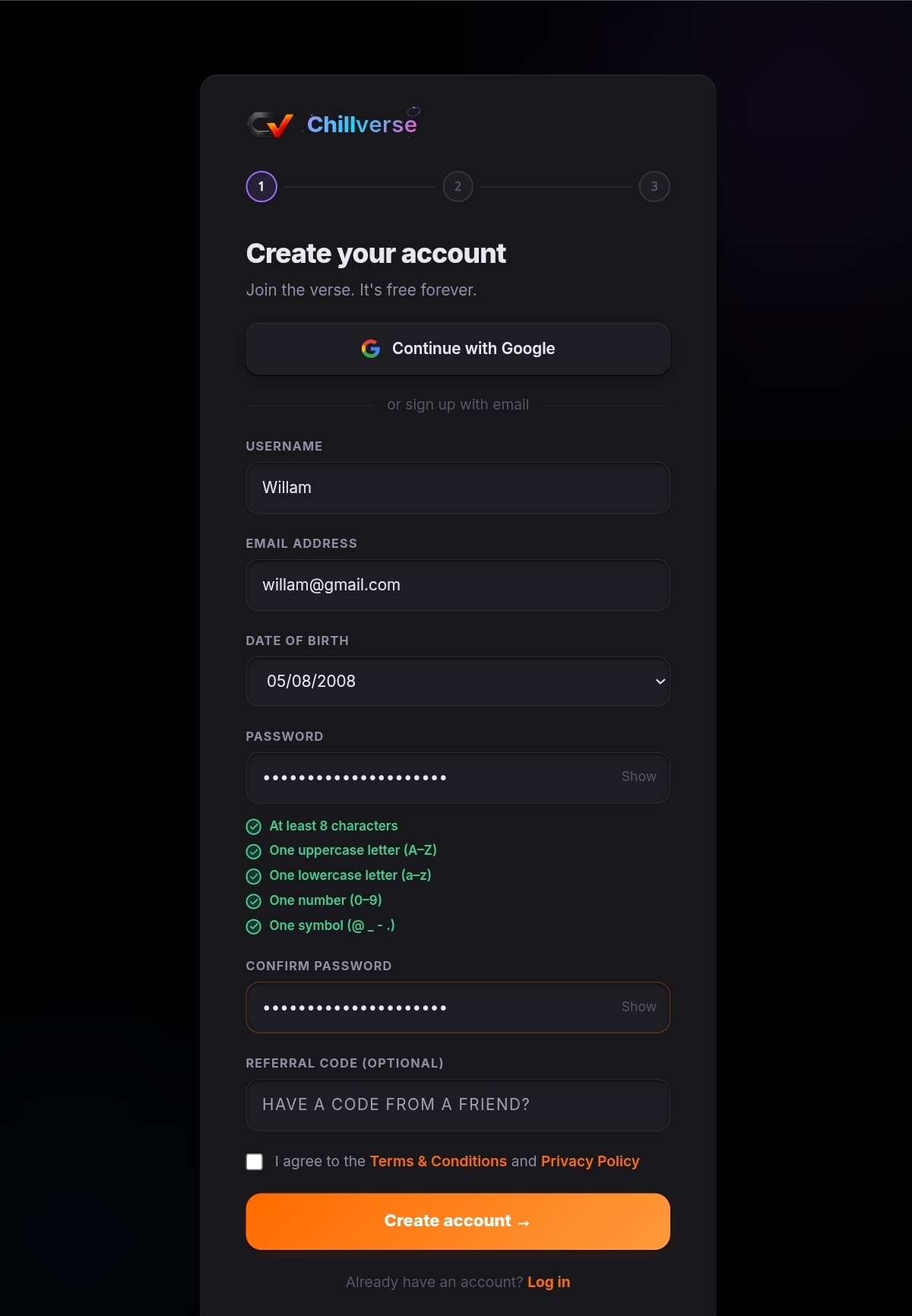
Username
Choose a unique username that other members will see.
Good examples:
Kenzo
Willam
AstroNova
Avoid:
Offensive names
Impersonating other users
Using personal information you don't want to share
Email Address
Enter a valid email address that you own.
You'll use this email to:
Log in
Recover your password
Receive important account notifications
Date of Birth
Select your date of birth.
This helps Chillverse provide an appropriate experience and verify eligibility where required.
Password
Create a strong password.
Your password must include:
At least 8 characters
One uppercase letter (A–Z)
One lowercase letter (a–z)
One number (0–9)
One special symbol (such as @, _, -, or .)
A strong password example:
ChillVerse290&%a (this is an example, do not copy)
Never share your password with anyone.
Confirm Password
Enter the exact same password again.
If the passwords don't match, you'll need to correct them before continuing.
Referral Code (Optional)
If a friend invited you to Chillverse, enter their referral code here.
Don't have one?
Simply leave this field empty and continue.
Step 3: Accept the Terms
Before creating your account, check the box confirming that you agree to the:
Terms & Conditions
Privacy Policy
You'll need to accept these before you can continue.
Step 4: Create your account
Click the Create Account button.
If everything is correct, your Chillverse account will be created successfully.
You're now ready to explore the community.
Troubleshooting
I can't create my account
Double-check that:
Your username is available.
Your email address is entered correctly.
Your password meets all requirements.
Both passwords match.
You've accepted the Terms & Conditions.
My Google sign-in isn't working
Try:
Refreshing the page.
Signing into your Google account first.
Using another browser or device.
Signing up with your email instead.
I forgot my password
Use the Forgot Password option on the login page to reset your password.
What's next?
Once your account is created, you can:
Complete your profile.
Discover communities.
Join events.
Earn rewards.
Explore games and activities.
Welcome to Chillverse, we're excited to have you here! Connect with other members